


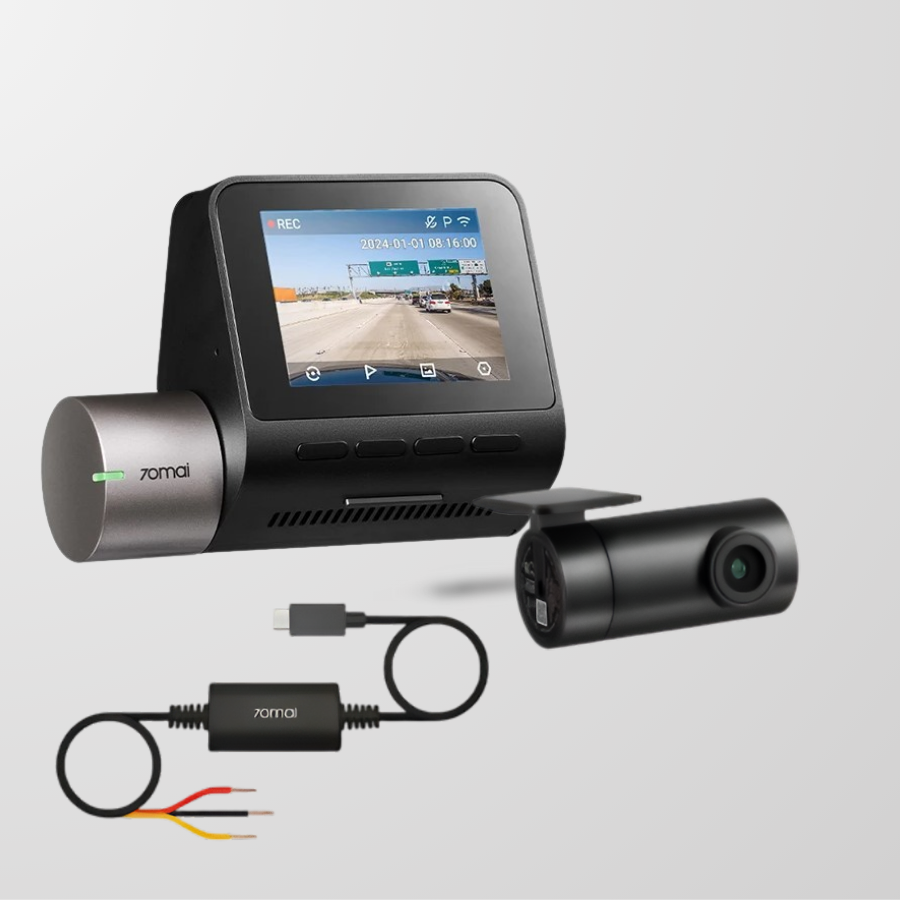
🛡️ 70mai RoadGuard Vision — Smart 2.7K Dash Cam with GPS & ADAS
The 70mai RoadGuard Vision is your intelligent driving companion, combining ultra-clear 2.7K HDR video with built-in GPS tracking, advanced ADAS safety alerts, and sleek app control — all in a compact, modern design made for today’s Dubai roads.
Whether you're commuting on Sheikh Zayed Road or parking under the desert sun, this smart dash cam delivers unmatched visibility, 24/7 security, and crystal-clear evidence when you need it most.
🔍 Key Features:
- High-Resolution 1944P (2.7K HDR) Recording
Capture sharp, detailed video even in low light — perfect for license plates, traffic signs, and night driving. - 140° Wide-Angle Lens
See more of the road — cover up to 3 lanes of traffic with minimal distortion. - Sony STARVIS Sensor + HDR Night Vision
Get high-clarity footage day or night, thanks to the industry-leading STARVIS imaging chip. - Built-In GPS Module
Automatically records your speed, route, and location data — essential for insurance claims and incident proof. - ADAS Safety Alerts
Includes Lane Departure Warning and Forward Collision Warning to help prevent accidents before they happen. - App Control + Real-Time Preview
Instantly access, download, and share footage from the 70mai mobile app via built-in Wi-Fi. - 24/7 Parking Surveillance
Records impact or motion while your car is parked (requires constant power supply).
Wiring crowbar*1
Front cam power cord*1
Rear cam power cord*1 (optional)
Car charger*1
Mount*1
Adhesive sticker*1
Front cam user manual*1
Rear cam user manual*1 (optional)
Front Cam*1
Rear Cam*1 (optional)
Hardware kit Up03*1 (optional)
🔧 1. Install the Front Dash Cam:
Clean the windshield behind your rearview mirror.
Attach the electrostatic sticker, then stick the dash cam mount on it.
Plug the power cable into the car's cigarette lighter port (or hardwire if using UP04).
Use the included tool to tuck the cable along the roof lining and down the side panel to hide wires.
🎥 2. Install the Rear Camera (optional):
Mount the rear cam on the rear windshield (interior-facing).
Connect the cable to the main dash cam (AV-in port).
Route the wire through the roof lining to the front — keep it hidden and tidy.
📡 3. Set Up 4G Connectivity (with UP04 Kit – sold separately):
Replace cigarette lighter power with UP04 hardwire kit (connect to fuse box).
Insert your nano SIM card into the UP04 module.
The cam now supports:
Remote live view
Instant phone alerts
24/7 monitoring, even when the car is off
🔋 Important: Hardwiring allows the dash cam to stay powered even when the engine is off, enabling full security mode.
To enable uninterrupted 4G remote access, live view, and real-time alerts, the RoadGuard Vision requires the 70mai UP04 4G Hardwire Kit, sold separately.
This kit allows for SIM card insertion and 24/7 power, enabling full remote features even when your car is off.
Our commitment to your satisfaction is evident in our products, backed by a 30-Day, Money-Back Guarantee.
One year warranty not including the battery

Your Silent Driving Insurance
Accidents, fines, and fraud happen fast — but your dash cam never misses a second. With reliable loop recording and event detection, the 70mai RoadGuard Vision becomes your digital eyewitness on the road, helping you dispute false claims and avoid costly mistakes. Peace of mind? Always on.

Every Detail Captured — In Motion or Still
Record the full story, front and back. The front camera captures ultra-sharp 1944P (2.7K) resolution at a fluid 60 FPS with a 140° wide-angle lens, even at night— while the rear camera adds HD rearview protection to cover tailgaters and parking accidents. Whether you're reversing, cruising, or braking, you’ll have every critical angle recorded in full detail.

24/7 Parking Protection — Even When You're Not There
Even when the engine’s off, the RoadGuard Vision has your back. Paired with the UP04 hardwire kit, it activates 24-hour parking surveillance, including:
-To save storage while keeping important clips
-To instantly record impact events
-To condense hours into seconds for quick reviews
Never worry about who hit your car in the parking lot again — you’ll have the proof.

Built-in GPS & ADAS for Safer Drives
Driving in Dubai can feel overwhelming — fast lanes, sudden merges, and aggressive drivers are daily risks. That’s why the RoadGuard Vision comes with Advanced Driver Assistance System (ADAS) and built-in GPS, turning your dash cam into a smart safety assistant.
🚗 How it works & how it protects you:
-If you drift out of your lane without signaling, the cam detects lane lines and alerts you with a voice warning — helping prevent sideswipes or accidents from distraction or drowsiness.
-If you're driving too close to the car ahead and a collision risk is detected, you’ll get a real-time alert to slow down. This gives you crucial extra seconds to brake — especially in stop-and-go traffic.
-Stuck in traffic and lost in thought? When the vehicle ahead moves but you don’t, the cam notifies you to start driving, preventing honks or accidents in busy intersections.
-Every video is stamped with accurate speed, location, and route data. If there’s an incident, you’ll have clear proof of your exact location and driving behavior — protecting you from false claims and helping with insurance.

Advanced 4G Connectivity for Real-Time Control
Stay connected with 4G remote access (requires 70mai UP04 hardwire kit). View footage, receive alerts, or locate your vehicle from anywhere via the 70mai app. Whether you're traveling, working, or away on holiday, your car is just a tap away — thanks to cutting-edge 4G IoT integration.
🔒 Note: To activate 4G features like live streaming and remote tracking, the 4G Hardwire Kit (sold separately) is required.
- Choosing a selection results in a full page refresh.
- Opens in a new window.